A CMS approval workflow is a controlled sequence of handoffs from an approved source to a checked CMS draft, an authorized release, and a verified live destination. It is not just a list of statuses and it is not the same as adding comments to a document.
A useful workflow makes five things visible for every transition:
- The state: what is true about the item now.
- The owner: who is accountable for the next decision.
- The evidence: what proves the state was reached.
- The next action: what may happen next.
- The blocker: what prevents movement.
This model works for WordPress without assuming that every installation has the same roles, statuses, or plugin features. The important control is the distinction between an approved source, a CMS draft, release approval, publication, and post-publication verification.
What the workflow controls—and what it leaves separate
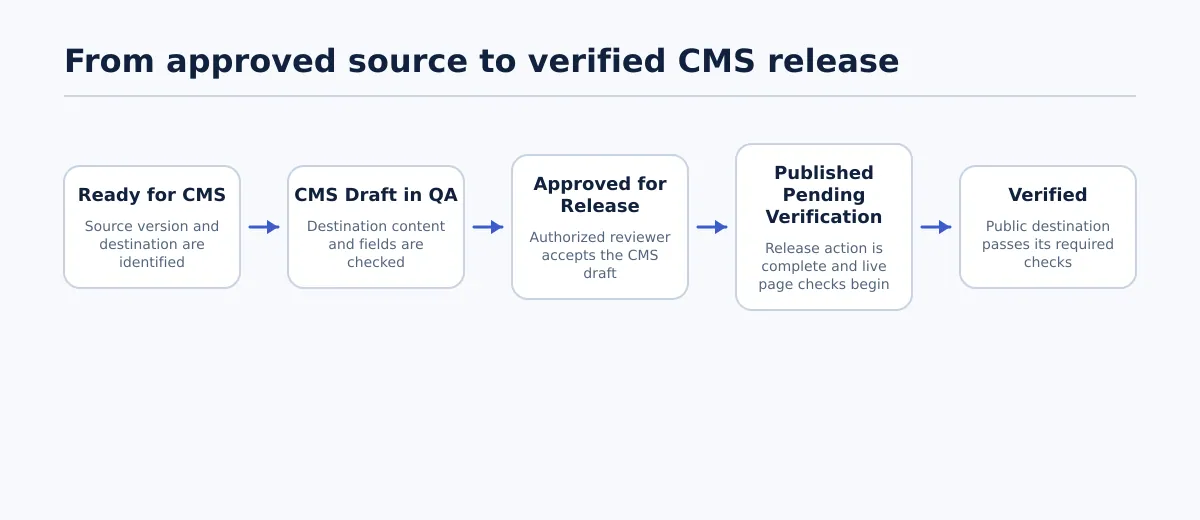 A CMS approval workflow separates source handoff, destination QA, release authorization, publication, and post-publication verification.
A CMS workflow controls the movement of content between defined states. It does not replace editing, source approval, destination QA, publishing authority, or live-page checking. Those activities may be connected, but they answer different questions.
For a typical content release, the decisions are:
- Source handoff: Is this source version ready to be transferred to the intended destination?
- CMS draft QA: Does the destination draft contain the right content, assets, fields, and formatting?
- Release approval: Has an authorized person approved this particular CMS draft for publication?
- Publication: Was the approved draft released to the intended site and URL?
- Verification: Does the public destination match the release requirements?
An editor’s approval of a Google Doc answers the first question. It does not prove that a WordPress draft contains the correct links, heading hierarchy, featured image, taxonomy, or metadata. Likewise, a reviewer’s comment can identify a defect without authorizing publication.
The workflow should therefore record the source version and the CMS draft separately. If a source changes after the draft is created, the team can determine whether the draft is still based on the approved material or needs another review.
For the source-to-draft portion of the process, see How to Import Google Docs to WordPress Without Skipping Draft QA. The approval workflow begins where that transfer needs an accountable decision and continues until the live destination has been checked.
Build a small state model before choosing tools
The following six-state model is a practical synthesis for a small content team. It is deliberately smaller than a full editorial lifecycle. A team can add states for legal review, localization, scheduling, or client review when those decisions genuinely require separate ownership.
The status name matters less than its entry condition and completion evidence. If a team cannot explain what allows an item to enter or leave a state, the status is probably acting as a label rather than a control.
| State | Entry condition | Owner | Required evidence | Allowed next transition | Blocker condition |
|---|---|---|---|---|---|
| Ready for CMS | The source version, destination, scope, and release requirements are identified; source-level approval is recorded where required. | Source or editorial owner | Source URL or file reference, version or approval date, intended destination, title, and named CMS owner | Move to CMS Draft in QA | Source version is unclear, approval is missing, destination is unknown, or required assets are not assigned. |
| CMS Draft in QA | A destination draft exists and is linked to the source record. | CMS publisher or QA owner | Draft URL or post ID, field mapping, content comparison, and destination QA results | Move to Approved for Release or Changes Required | Content cannot be compared, required fields are incomplete, formatting is damaged, or an asset or link is unresolved. |
| Changes Required | A reviewer or QA owner has recorded a defect that prevents approval or release. | Owner of the failed item, assigned by the reviewer or release owner | Specific defect, affected field or section, assigned owner, and source or draft version to use | Return to CMS Draft in QA after repair, or return to Ready for CMS if the source must change | Defect has no owner, the requested change is ambiguous, or the revised source has not been identified. |
| Approved for Release | The CMS draft passed required checks and an authorized approver accepted the identified version for the stated destination and release scope. | Release approver | Approved draft URL or ID, version or timestamp, approval outcome, release constraints, and release owner | Move to Published Pending Verification | Unresolved comments, missing assets, unconfirmed metadata, conflicting instructions, or an unassigned exception remains. |
| Published Pending Verification | The release owner or publisher completed the authorized publication or scheduling action. | Release owner | Final destination URL, publication result, intended status or date, and release timestamp | Move to Verified or Changes Required for a live defect | URL, status, date, visibility, or destination cannot be confirmed; a required live element is missing. |
| Verified | The public destination was checked against the release requirements and any defects were closed or assigned under an explicit decision. | Release owner or verification owner | Final URL, verification checklist, result, timestamp, and defect disposition | Close the record or open a new change record for a later update | Live checks were skipped, the page is wrong or incomplete, or an open defect has no named owner. |
This matrix prevents three common misclassifications: treating an approved source as an approved CMS draft, treating a published item as a verified page, and treating a comment as a release decision.
A WordPress site may represent these states with built-in statuses, custom workflow statuses, a separate project record, or a combination of tools. The process should not depend on one universal WordPress approval workflow. Record the state somewhere the team can inspect, and define which system is authoritative for the final release decision.
Assign roles without turning approval into a queue
A workflow needs separation of responsibility, but it does not require a different person for every action. Small teams can combine roles if the combination is explicit and the approval boundary remains clear.
| Role | Typical responsibility | Permission boundary |
|---|---|---|
| Writer or source owner | Prepares the source and responds to content changes. | May revise source content but does not automatically approve the CMS draft or publish it. |
| Editor | Checks content quality, scope, structure, and source readiness. | May move an item to Ready for CMS or request changes, subject to the team’s policy. |
| Subject or client reviewer | Confirms factual, brand, or destination-specific requirements within the assigned scope. | May approve or request changes only within the authority granted for that release. |
| Publisher | Creates or updates the CMS draft, completes destination checks, and performs the release action when authorized. | Should not infer release authority from the ability to edit or publish in the CMS. |
| Release owner | Confirms that the approved draft, timing, destination, and verification result belong to the same release. | Owns the final closeout and assigns live defects. |
The team can combine editor and release owner for low-risk work, or publisher and verification owner when the release policy permits it. The combination should be recorded rather than assumed.
A useful decision rule is: the person who requests a change should not silently mark that change resolved unless the team has explicitly assigned that authority. If a publisher fixes a broken link found during QA, the publisher can record the repair, but the workflow should still identify whether another reviewer must confirm the change before approval.
Permissions should follow the state model. Someone may be allowed to edit a draft without being allowed to approve it. Someone may be allowed to publish a post without being the person authorized to decide that it is ready. WordPress roles and additional workflow controls vary by installation, so map the actual permissions before relying on them.
Make the source-to-CMS handoff reviewable
The handoff record is the bridge between an approved source and a destination draft. It should be short enough to complete for every item and specific enough to resolve a question without searching through messages.
At minimum, record:
- Source: URL, file reference, version identifier, or approval date.
- Destination: site, post type, destination URL if known, and WordPress post ID once created.
- Content identity: intended title, slug, author, and content scope.
- Taxonomy: category and tags where the destination requires them.
- Assets: featured image, inline images, captions, alternative text, and asset status.
- Links: links requiring review, redirects or replacements, and unresolved link exceptions.
- Metadata: excerpt, SEO fields, canonical instructions, or other destination-specific fields where applicable.
- Authority: approver, publisher, release owner, and permitted release date or status.
- Exceptions: anything deliberately deferred, with an owner and next action.
The source reference should identify the version, not merely the document title. “Client article” is not enough if the document can change while the CMS draft is being prepared.
Once the WordPress draft exists, run a destination-side QA pass. Compare the source and draft in an order that exposes structural problems early:
- Title and headings: Confirm the title field and heading hierarchy match the approved structure.
- Body content: Check paragraphs, emphasis, lists, tables, and other supported elements for omissions or unintended changes.
- Links: Open or otherwise validate important links and confirm that visible link text points to the intended destination.
- Images and embeds: Confirm that the correct assets are present, positioned correctly, and accompanied by required captions or alternative text.
- CMS fields: Check slug, author, categories, tags, excerpt, metadata, and intended status or schedule.
- Rendering: Inspect the draft preview or destination view for broken lists, empty blocks, unexpected spacing, and other conversion or formatting defects.
Do not silently repair a meaning-changing mismatch. Record the field or section affected, the change made, and whether the correction requires another approval. For a formatting-only repair within the publisher’s authority, the record may be enough; for a changed claim, link destination, title, or release instruction, route the item back to the appropriate owner.
Turn approval into an explicit gate
Approval should produce an unambiguous outcome, not a general impression that the draft “looks good.” Use three outcomes:
- Approve for release: The named CMS draft version may proceed under the recorded release conditions.
- Changes required: A specific defect must be repaired and checked before approval can be reconsidered.
- Blocked: The team cannot make a valid approval decision because a dependency, authority, asset, or instruction is missing.
Before selecting Approve for release, confirm that:
- The CMS draft is the intended destination item.
- The source version used for the draft is recorded.
- Required headings, body content, links, images, lists, and metadata have been checked.
- The featured image and other required assets are present or have an explicit approved exception.
- Reviewer comments are resolved, rejected with a recorded reason, or assigned for a later stage that does not block this release.
- The release owner, timing, status, and destination are known.
- No change made after the last approval has altered the approved scope.
The approval record should identify the draft URL or post ID and the version or timestamp reviewed. “Approved” without an object and version leaves the team unable to tell which draft was accepted.
If a reviewer requests a change, route it according to where the defect originated. A source wording or factual change normally returns to the source owner and then goes through the handoff again. A transfer or formatting defect can return to the CMS publisher. A missing release instruction returns to the release owner. The person receiving the request should be named in the record rather than inferred from a comment thread.
Release the approved draft, then verify the destination
Publication is an action, not proof that the release succeeded. The publisher or release owner should confirm that the item being released is the same CMS draft that received approval.
A controlled release sequence is:
- Confirm the approved draft URL or post ID against the record.
- Confirm the intended destination site, post type, status, and publication or schedule date.
- Check that any release constraint—such as a required author, category, or featured image—is still true.
- Publish or schedule the item using the authority assigned to the release owner or publisher.
- Record the result, including the final URL and publication timestamp where available.
- Open the public destination and complete the verification checks.
The post-publication check should cover the canonical live URL, visible title and headings, body content, featured and inline images, internal and external links, list rendering, assigned metadata, expected embeds, visibility, and publication timing. The exact fields depend on the destination, but each required check needs a pass or an assigned defect.
Close the release only when the verification owner records a successful result. If the live page is missing an image, has the wrong status, or contains a failed link, leave the item in Published Pending Verification or move it to a clearly defined defect state. Assign the repair to a named owner and record whether the page should remain live, be corrected in place, or be taken out of release according to the team’s policy.
A worked WordPress release from source to verified URL
Consider an agency preparing a client article from an approved Google Doc. The example is illustrative; it does not depend on a particular WordPress plugin or installation configuration.
1. Record the source handoff
The editor records the Google Doc reference, the approved revision, intended WordPress site, article title, required author, category, featured-image requirement, and release owner. The item enters Ready for CMS.
The publisher creates a WordPress draft and records its post ID and editor URL. The publisher transfers the title, body, headings, lists, links, images, and required fields. The item enters CMS Draft in QA.
2. Return a draft with a concrete defect
During the link check, the editor finds that one source link points to an outdated destination. The issue is not treated as a minor comment because the approved source and destination requirement no longer align.
The editor moves the item to Changes Required and records:
- the affected paragraph and link text;
- the current destination and intended destination, if known;
- the person responsible for confirming the replacement;
- the source revision that must be updated or confirmed; and
- the condition for returning to QA.
The source owner corrects the Google Doc and identifies the new approved revision. The publisher updates the WordPress draft from that revision, checks that the old link is gone, and reruns the affected content and link checks. The handoff record now contains both the original draft reference and the corrected source version.
3. Approve the corrected CMS draft
The approver reviews the corrected draft rather than relying on the earlier decision. The approval record names the WordPress post ID, the corrected source revision, the approval timestamp, the release owner, and any release constraints. The item moves to Approved for Release.
This second decision is necessary because the source changed after the first draft review. A source-level correction does not automatically make the existing CMS draft approved.
4. Publish and catch a live defect
The publisher confirms the post ID and release instructions, publishes the approved draft, and records the live URL. The item enters Published Pending Verification.
During the live-page check, the release owner finds that the featured image is missing even though the body content and links are correct. The release is not marked complete. The missing image is assigned to the publisher, who adds the approved asset and checks its presentation on the live page.
The release owner reruns the image and page checks, records the corrected verification time, and moves the item to Verified. The record now shows two different control points: the CMS draft was approved before publication, and the live destination was verified after the defect was repaired.
Exception rules for blocked and late work
Exceptions are normal. What makes them dangerous is allowing them to remain informal. Use a named owner, a recorded state, and a next decision for each one.
No response by the review deadline
Do not treat silence as approval. Keep the item in its current state, record the missed review deadline, notify the designated escalation owner, and set a revised decision date. If the release window expires, record an explicit decision not to release or a new release instruction.
A source changes after CMS approval
Pause the release and compare the new source revision with the approved version. If the change affects meaning, title, links, assets, metadata, or release scope, return the item to the appropriate source or CMS QA state. Record the new revision and require a new approval for the changed draft.
A required image or asset is missing
Move the item to Changes Required or Blocked, depending on whether the asset can be supplied within the current release. Assign the asset owner and record the release decision. Do not assume that a placeholder, an old asset, or an unconfirmed image is acceptable merely because the text is approved.
Reviewers give conflicting instructions
Do not ask the publisher to choose silently. Identify the decision owner for the disputed field, record both instructions, and pause the affected transition until one instruction is confirmed. If the conflict changes the source, update the source version before rebuilding or rechecking the draft.
The live check fails
Keep the item out of Verified. Record the public URL, failed check, severity as defined by the team, repair owner, and next verification time. If the defect affects the intended audience or release conditions, the release owner should decide whether to correct in place, temporarily change the release status, or document an approved exception.
These rules keep an item from disappearing between a comment, a CMS status, and a live page. They also prevent a team from using “approved” as a substitute for an actual decision about an unresolved defect.
Start with one matrix and one handoff record
A small team does not need a complex workflow to gain control. Begin with the six states in the matrix, assign one owner for each transition, and test the model on the next WordPress release.
At the end of that release, ask:
- Could the team identify the exact source version used?
- Could someone tell which CMS draft was approved?
- Did every failed check have an owner and next action?
- Was publication performed by an authorized person?
- Was the public URL verified separately from the CMS editor?
If any answer is unclear, revise the state definition or handoff record before adding automation. For a WordPress-focused application of the same source, draft, approval, and release boundaries, see CMS Approval Workflow: A Practical Model for WordPress Content Teams.
The practical next step is to document one workflow-state matrix and one handoff record for the next article. That gives the team a visible answer to what is approved, what is ready to release, what is blocked, and what still needs to be verified.