A Google Doc can be approved while the Blogger post is still incomplete. Copying the content into Blogger creates a draft; it does not confirm that the right version was transferred, the destination is correct, the formatting survived, or the public page is ready for readers.
A dependable Google Docs to Blogger workflow treats publishing as a controlled handoff. The source document, Blogger draft, approval decision, publication event, and live-page check are separate states. Each state needs an owner and an observable completion condition.
This guide gives content teams and agencies a practical process for moving an approved Google Doc into Blogger without treating transfer as release.
Start with the five publishing states
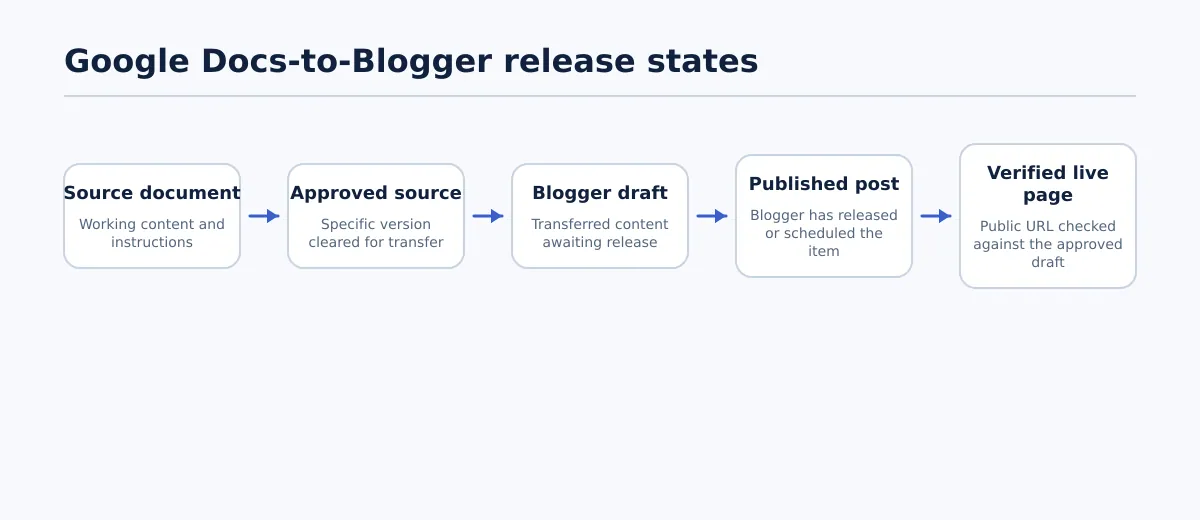 A Google Docs-to-Blogger handoff moves through separate source, approval, draft, publication, and verification states.
Before choosing a transfer method, identify the state of the item. The following release matrix prevents a team from describing a draft as published or assuming that editorial approval also authorizes release.
| State | What it means | Responsible owner | Completion condition |
|---|---|---|---|
| Source document | The working Google Doc contains the proposed article and supporting instructions. | Writer or content owner | The document is identifiable, in scope, and ready for editorial review. |
| Approved source | A specific version of the Google Doc has been approved for transfer. | Editor or approver | Copy, structure, links, assets, destination, and unresolved exceptions have been reviewed. |
| Blogger draft | Content has been placed in the selected Blogger blog but is not yet public. | Publisher | The draft URL and status are recorded, and the transferred content has been inspected. |
| Published post | Blogger has released or scheduled the post according to the release decision. | Release owner | The intended publication action has completed for the selected blog and post type. |
| Verified live page | The public result has been opened and checked after release. | Release owner or QA reviewer | The final URL, visible content, links, assets, visibility, and destination have passed verification. |
A Blogger draft may exist while approval is pending. An approved source may still need destination-specific cleanup. A scheduled post is not a verified live page until it is available at its public URL and has been checked.
The handoff should record the current state explicitly. If a required decision is blank, conflicting, or based on an assumption, stop at the current state and assign the missing decision rather than moving the item forward.
Choose a transfer route before opening Blogger
The right route depends on how often the team publishes, how much formatting needs inspection, and how much control is required before release. There is no single best method for every Google Docs-to-Blogger workflow.
| Route | Use it when | Control and risk to account for |
|---|---|---|
| Manual draft creation | The post is occasional, the content is straightforward, and a publisher can compare the source with the Blogger draft. | The publisher must remove unwanted formatting and perform the complete draft QA. Copying content is only the transfer step. |
| Structured export | The team repeats the same handoff and needs more consistent handling of headings, lists, links, or images. | Test the export against the destination blog and document which elements need manual repair. Repeatability does not prove formatting fidelity. |
| Drive-triggered automation | The source volume justifies automation and the trigger, destination, approval timing, and exception process are explicitly controlled. | A new document in a folder can initiate a Blogger action, but a folder event is not the same as editorial or release approval. Keep automatic publication away from approval-controlled content unless the control model deliberately supports it. |
For example, an IFTTT applet can use a new document added to a selected Google Drive folder to create a Blogger post. That may fit a low-risk stream of already-approved material, but it is not automatically suitable for client content that requires a named approver and final QA. The trigger, destination blog, post status, and handling of errors must be defined before the team relies on it.
Use manual transfer for a one-off post when the review time is available. Consider a structured export when repeated formatting repairs are creating avoidable work. Consider automation only after the team has a tested source convention, a controlled destination, an approval boundary, and a way to identify exceptions. In all three cases, the Blogger draft still needs a destination-specific check.
Make the Google Doc ready for handoff
The Google Doc should be treated as the source of record for the approved content, not as a complete description of every Blogger field. Before transfer, the content owner and approver should settle the decisions that a publisher should not have to infer.
Confirm these source conditions:
- Title: The final title is present and matches the intended post.
- Heading hierarchy: Headings use a consistent structure and do not rely only on bold or enlarged text.
- Approved copy: Suggestions, tracked changes, and editorial comments are resolved, excluded, or assigned to a named owner.
- Links: Each visible link has the intended destination. Placeholder URLs and links that still need approval are recorded as exceptions.
- Images: Each image has a final file or a documented source, placement instruction, and any required caption or alternative text.
- Lists and special content: Ordered lists, unordered lists, tables, quotes, and code-like passages are identified so the publisher knows what to inspect after transfer.
- Destination details: The target Blogger blog and whether the item is a post or page are recorded.
- Publishing fields: Labels, search description, timing, and other destination fields are supplied where the team uses them.
- Approval: A named approver has approved this version for the stated destination and release scope.
Open comments and placeholder text do not necessarily block the handoff, but they must have an owner and a disposition. For example, “confirm product link” can be transferred only if the record says who will confirm it and whether the Blogger draft may remain blocked until that happens.
A useful source pass condition is: the version is identifiable, the content is approved for transfer, required assets and destination fields have owners, and every unresolved exception has a next action.
Create the Blogger draft, then inspect what arrived
Transfer the approved source using the route selected for the assignment. Immediately record the destination blog, post or page choice, draft URL if available, source version, transfer method, and publisher. This creates a trace between the Google Doc and the Blogger item before cleanup begins.
The first inspection should compare the draft with the approved source in a deliberate order:
- Title and opening: Confirm that the title and introductory content are present and in the right fields.
- Headings: Compare the sequence and level of headings. A visual style that looks like a heading in Google Docs may not produce the intended structure in Blogger.
- Paragraphs and spacing: Remove accidental empty paragraphs, duplicated line breaks, and formatting that conflicts with the destination’s normal presentation.
- Lists: Check item order, numbering, indentation, and whether nested items remain understandable.
- Links: Open or inspect each important link and compare its destination with the source record. Do not assume that visible link text proves the URL is correct.
- Special blocks: Review blockquotes, tables, and code-like content where used. If the destination cannot represent an element reliably, record the required alternative rather than silently changing its meaning.
- Images: Confirm that each image is present, associated with the correct section, and accompanied by the required caption or alternative text where the publishing process calls for it.
The draft is not ready merely because the text appears in Blogger. The publisher should record repairs separately from source content. If a cleanup changes an approved heading, link, sentence, or asset, send that change back to the applicable content owner or approver.
Run the Blogger pre-publication QA gate
Use the following check as a pass/fail release gate. Mark each row Pass, Revise, or Blocked, and assign every failure to a person who can resolve it. The release owner should not publish while a required row is Revise or Blocked unless an authorized owner has explicitly accepted the exception.
| Check group | Observable pass criterion | Failure owner |
|---|---|---|
| Structure | The title, headings, paragraphs, lists, and special content match the approved source and read in the intended order. | Publisher for transfer defects; editor for content changes. |
| Links | Required links contain the intended destinations, and no placeholder or unresolved link remains without an accepted exception. | Publisher or content owner, depending on whether the URL or transfer is wrong. |
| Images | Required images are present, placed with the correct content, and have the required captions or alternative text. | Publisher for placement; content or asset owner for missing material. |
| Labels and search description | Labels and the search description are complete when the team requires them, and their values match the handoff record. | Publisher or SEO/content owner. |
| Post or page selection | The item is created as the intended Blogger content type in the intended blog. | Publisher. |
| Publication settings | The selected release mode, visibility, and timing match the approved handoff. | Release owner. |
| Rendered appearance | The preview or rendered view has no obvious spacing, overflow, missing-image, or unreadable-formatting defect at the checks required by the team. | Publisher or QA reviewer. |
Run the checks against the draft rather than relying on the Google Doc preview. The document and Blogger use different rendering contexts, so a source that looks correct can still require destination cleanup. Conversely, do not “fix” a mismatch by changing approved meaning without recording the change.
The Blogger draft passes the gate when all required rows are Pass, or when each exception has a named owner, documented decision, and explicit approval to proceed. A release owner should be able to explain why the item is allowed to move forward without reconstructing the decision from chat messages or recent Drive activity.
Reconcile a changed Google Doc after draft creation
Late source changes are normal; invisible revision drift is the problem. Once the Blogger draft exists, every material source edit should be reconciled rather than assumed to have transferred automatically.
Consider this example:
- The editor approves a Google Doc and the publisher creates a Blogger draft.
- During a final review, the editor changes the heading “Choose a transfer route” to “Choose a Google Docs-to-Blogger transfer route” and replaces a link with the final destination.
- The publisher records both changes in the handoff record, including the source revision and the affected draft fields.
- The publisher updates the matching Blogger heading and link, then checks that no duplicate or old link remains.
- The editor confirms whether the new wording and link are covered by the existing approval. If the change is material under the team’s policy, the editor re-approves the source or the affected section.
- The release owner reruns the heading and link checks, plus the rendered appearance check if the changed heading affects layout.
The required owner map is straightforward: the change owner identifies and explains the edit, the publisher reconciles the draft, the approver decides whether release approval still stands, and the release owner authorizes publication after affected checks pass.
| Revision record field | Example |
|---|---|
| Source change | Heading revised; one link replaced. |
| Change owner | Editor. |
| Draft action | Update matching heading and link; search for the old link. |
| Approval decision | Existing approval retained after editor review, or sent back for approval. |
| Required recheck | Structure, links, and rendered appearance. |
| Release decision | Hold until recheck passes. |
Do not overwrite the source to make it resemble the draft, and do not publish the older draft because it was already prepared. Preserve the approved version, the changed version, and the reconciliation decision so the team can identify what was actually released.
Publish with a named owner and verify the public page
When the draft passes QA, a named release owner should publish or schedule it according to the handoff record. Record the action and timing. A scheduled post remains a scheduled post until its intended release time has passed and the public result can be checked.
After publication, open the public URL rather than relying only on the Blogger editor confirmation. Verify:
- The URL resolves to the intended Blogger blog and post or page.
- The public title and body match the approved draft.
- Headings, lists, spacing, and special content remain readable.
- Images load, appear with the intended content, and retain required captions or alternative text.
- Important links point to the approved destinations.
- The visibility and publication timing match the release decision.
- The page is not a preview, login page, error page, unintended redirect, or post on the wrong destination blog.
Record the final URL, publication time, verification owner, result, and any follow-up action. The workflow is complete when the public page has passed the agreed checks and the handoff record contains the outcome—not when someone clicks Publish.
Use a reusable handoff record for recurring posts
A compact record gives the publisher the context needed to act without guessing. Adapt the fields to your team, but keep the source, destination, approval, QA, and release information together.
Google Docs-to-Blogger handoff

Source URL:
Source document/version or approval date:
Destination blog:
Content type: post / page
Content owner:
Publisher:
Approver:
Release owner:
Desired publish time:
Transfer route: manual / structured export / automation
Labels:
Search description status: complete / not used / unresolved
Image status: complete / pending / exception recorded
Open exceptions and assigned owners:
Approval status:
Blogger draft URL:
Draft QA result: Pass / Revise / Blocked
Revision reconciliation required: yes / no
Final public URL:
Publication time:
Live verification result: Pass / follow-up required
Verification owner:
Follow-up action and due date:
For a recurring process, require the publisher to complete the draft URL and QA result before release, then require the release owner to complete the final URL and verification result afterward. This simple separation makes it possible to see whether an item is waiting on source approval, draft repair, release authorization, or live verification.
On the next Google Docs-to-Blogger assignment, use the handoff record before transferring the content and apply the QA gate after the Blogger draft exists. For the interface-specific transfer sequence, use the site’s Google Docs-to-Blogger publishing guidance; use this workflow to keep ownership, approval, exceptions, and verification visible from the approved Google Doc to the confirmed live page.